Le migliori app calendario per Android

Trovare un'applicazione perfetta per gestire al meglio i diversi impegni della giornata potrebbe rivelarsi un'impresa ardua sul Play Store. Le funzioni messe a disposizione devono essere non solo pratiche ma anche intuitive, dettaglio non da poco. Insomma, un preambolo per dirvi che non dovrete muovere un dito se non quello che userete per scorrere questo articolo e dare un'occhiata alle migliori app calendario per Android!
Google Calendar: la più popolare
Questo servizio non ha certo bisogno di un'introduzione, dato che si tratta del calendario più popolare del Play Store. Facile comprenderne il motivo: tutta l'esperienza di Google che ha alle spalle.
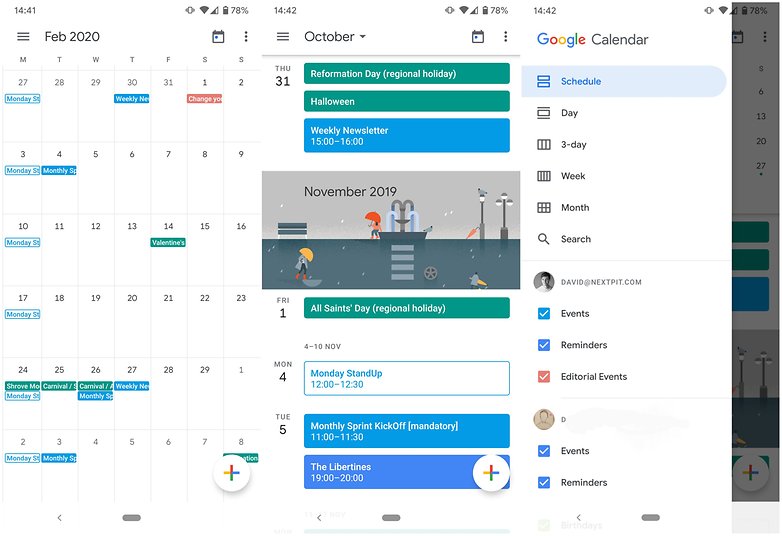
L'applicazione dispone di un'interfaccia relativamente semplice ed è organizzata in senso verticale: troverete tutti i vostri eventi listati in ordine cronologico uno dopo l'altro, interrotti da piccoli disegni al passaggio da un mese all'altro (seguono il cambio delle stagioni). Cliccando sul mese in alto vedrete apparire un calendario a griglia che occuperà metà dello schermo, mentre la metà inferiore continuerà a mostrare gli elenchi in agenda.
In alto a sinistra è presente un menu all'interno del quale avrete la possibilità di modificare la visualizzazione del calendario (giorno, settimana, mese), avviare una ricerca, attivare i promemoria, visualizzare compleanni e giorni festivi oltre ad accedere alle impostazioni.
Se utilizzate diversi calendari, sappiate che Google Calendar vi permetterà di visualizzare tutti i vostri eventi in un'unica agenda virtuale. Un piccolo punto a favore che velocizza il tutto è dato dal suggerimento delle parole una volta che iniziate a digitare il nome di un nuovo impegno.
Per coloro che utilizzano spesso il proprio account Google, questo calendario rappresenta decisamente la scelta più logica. L'aspetto grafico è naturalmente una questione di gusti, ma la sobrietà dell'app la rende adattabile a tutti i gusti.
${app-com.google.android.calendar}aCalendar: semplice ed efficace
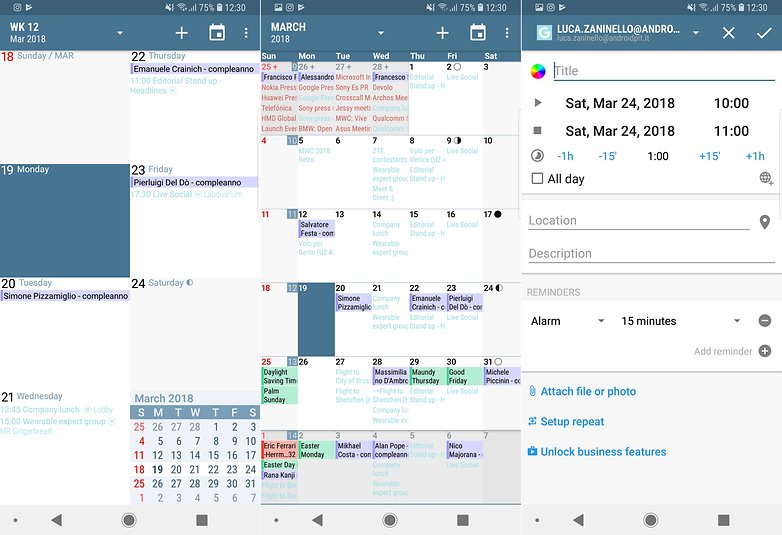
aCalendar è un'applicazione tedesca molto popolare. Questo servizio è riuscito a conquistare il cuore degli utenti per la sua semplicità. Con uno swipe verticale avrete la possibilità di passare da una data all'altra, mentre con uno orizzontale da un menu all'altro (mese, settimana, giorno).
Per quanto riguarda il design, vi ritroverete di fronte ad un look sobrio, quasi classico. In alto a sinistra troverete la data e la possibilità di attivare/disattivare i diversi calendari aggiuntivi. In alto a destra invece, noterete il simbolo + che vi permetterà di aggiungere un evento al calendario, ed un'icona per accedere a diverse funzioni oltre ad un sistema di ricerca. Infine l'app dispone di un pratico widget che mostra tutti gli eventi in programma.
aCalendar è un'applicazione semplice ed intuitiva che fa tutto ciò che si potrebbe volere da un calendario. Come dice lo stesso sviluppatore sul Play Store, non presenta funzioni inutili. Si tratta di un servizio gratuito, privo di pubblicità e ben disegnato. Per chi fosse interessato esiste anche una versione a pagamento dell'applicazione che offre un'esperienza a tutto tondo.
${app-org.withouthat.acalendar}Business Calendar 2: un'agenda intuitiva
Per molti è l'agenda più intuitiva disponibile sul Play Store. Business Calendar 2 è un'app ricca di funzioni ed opzioni di personalizzazione. Una volta avviata l'app, avrete la possibilità di impostare diversi tipi di design, scegliendo tra colori più classici e colori pastello e di scegliere tra 7 diversi widget per avere tutte le informazioni di cui avete bisogno a portata di mano.
Business Calendar 2 offre la possibilità di aggiungere contatti, posizione e note per ogni appuntamento e permette inoltre di avere a disposizione le previsioni del tempo. L'interfaccia è standard ed il calendario copre tutto lo schermo. In basso troverete i vostri diversi calendari riconoscibili facilmente perché ognuno di un colore diverso. Nel caso non vogliate visualizzarli tutti, vi basterà selezionarli per disattivarli. Questa funzione può essere molto pratica se utilizzate diversi calendari contemporaneamente, vi risparmierete diversi click tra i menu. Subito sopra i calendari avrete modo di scegliere quanti giorni vorrete visualizzare sulla schermata principale.
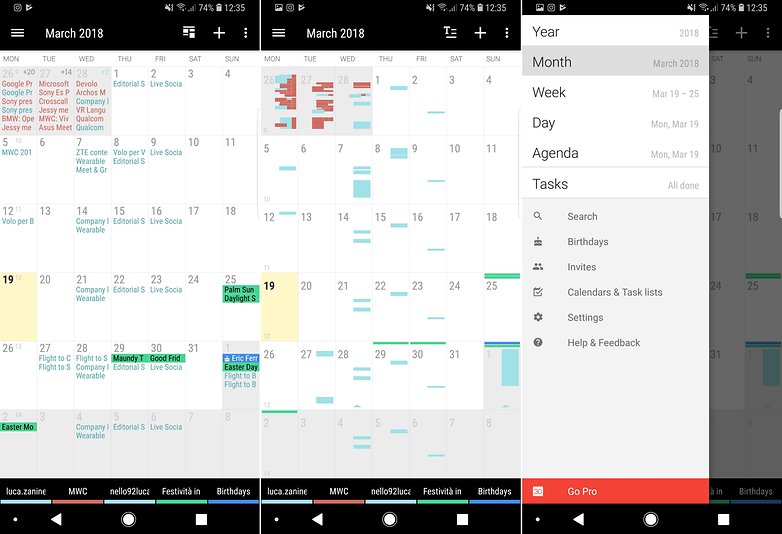
In alto a destra troverete le solite scorciatoie che consentono di tornare alla data corrente, creare un evento o accedere a diverse opzioni aggiuntive. In alto a sinistra è presente il menu per modificare la visualizzazione del calendario (anno, mese, settimana, giorno). È disponibile un widget per accedere alla vostra agenda direttamente dalla schermata home.
${app-com.appgenix.bizcal}Diario scuola: ideata per gli studenti
Diario Scuola è dedicata principalmente agli studenti studiata appositamente per tenere sotto controllo le varie lezioni e gli esami in programma, ma non solo. Potete scegliere il numero delle sessioni di esami al primo avvio e l'applicazione permette di impostare il calendario della vostra settimana tra i banchi. Diario scuola dispone anche di un'agenda per gli eventi extra, una vista del calendario mensile, la possibilità di registrare le note (o le lezioni) ed una grafica in material design davvero ben fatta ed abilmente organizzata.
È possibile gestire anche ritardi, uscite in anticipo, voti; dispone inoltre di una funzione di backup su Google Drive. Quasi dimenticavo: è interamente sviluppata da un programmatore italiano il che è un un punto a favore in caso vogliate segnalare bug o richiedere nuove funzioni!
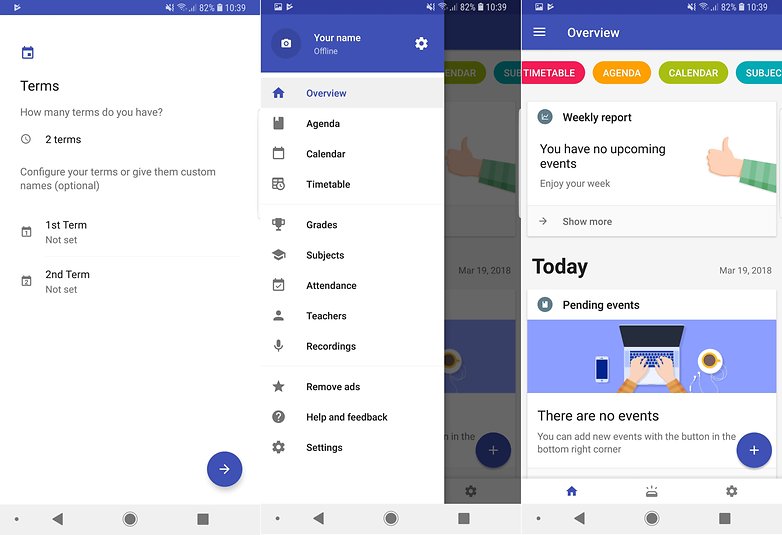
Se siete degli studenti a cui piace tenere sotto controllo ogni aspetto della vita tra i libri vale la pena dare un'occhiata all'app!
Utilizzate un'app diversa per salvare e visualizzare ogni giorno tutti i vostri impegni?


Secondo me su questo argomento c'è poco da discutere; Google Calendar tutta la vita.
Usavo da due anni Digical, ma ora sono passato a Google.
1) mi piace più l'interfaccia
2) manda email informative agli invitati all'evento mentre con Digical bisognerebbe passare alla versione Premium
3) Digical ha troppe personalizzazioni per me superflue che, essendo tante, ne rallentano le impostazioni
4) Google ci offre sempre più servizi e penso che Google Calendar possa essere maggiormente collegato a questi e dare perciò un risultato migliore
Di Google Calendar migliorerei la modalità di inserimento di un nuovo evento che è farraginosa e lenta
Avete provato quello di Samsung? Peccato non lo si possa installare dappertutto