I migliori navigatori GPS da utilizzare offline su Android
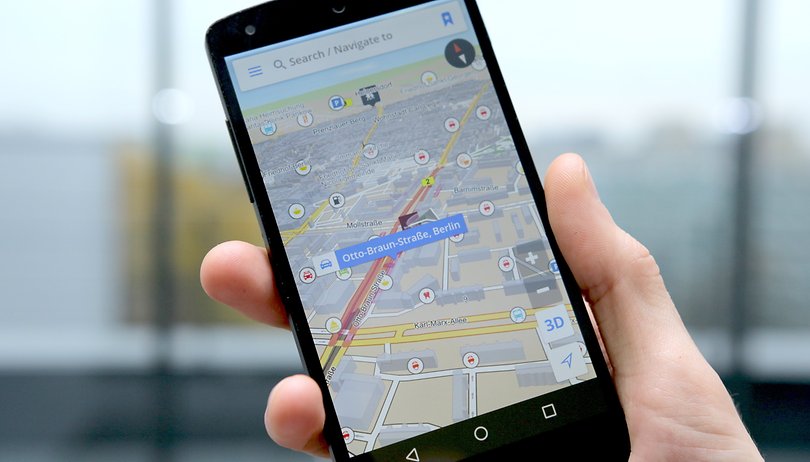

Chi dice che per utilizzare un navigatore GPS occorre necessariamente avere a disposizione internet? Ecco le migliori app che vi permetteranno di navigare offline su Android: servizi facili da usare e sempre aggiornati che vi permetteranno di arrivare dritti a destinazione anche in assenza di rete!
Google Maps: per chi non vuole rischiare
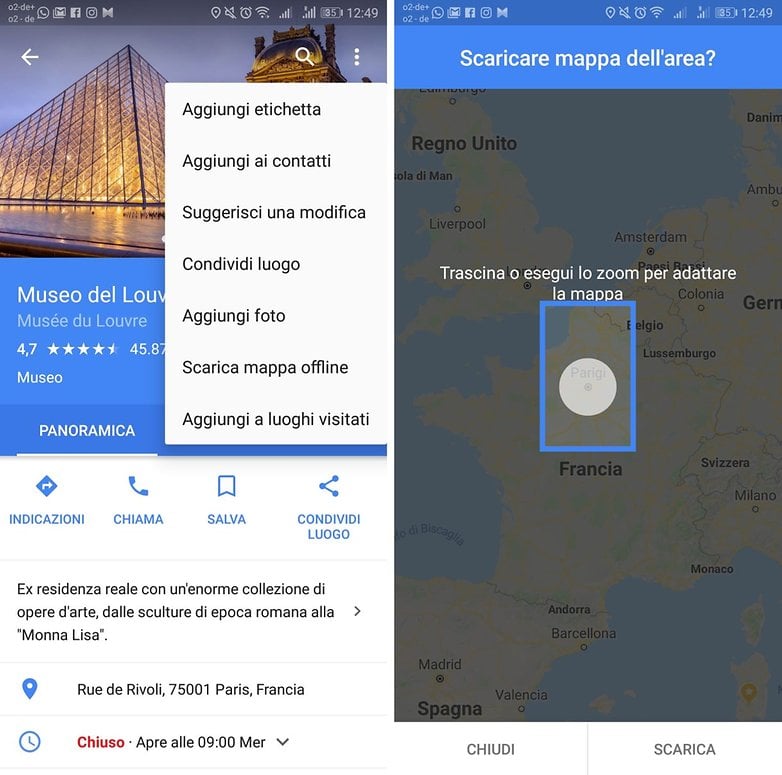
Non avete alcuna intenzione di installare nuove app sul vostro smartphone? Allora vi consigliamo Google Maps, grazie ad una delle tantissime funzioni implementate al suo interno. È infatti possibile selezionare determinate aree geografiche e scaricarne la mappa offline.
Il vantaggio di Google Maps è che chiunque conosce la sua interfaccia e sa come utilizzare la maggior parte delle funzioni, dalla navigazione alla ricerca di determinati punti di interesse. Naturalmente, è possibile fare tutto questo anche offline, poiché Google Maps vi permette persino di salvare porzioni di mappe da utilizzare successivamente senza alcun tipo di connessione ad Internet.
Maps.me: facile da usare
Maps.me è un'app gratuita che permette di scaricare ed utilizzare offline mappe dettagliate di qualsiasi Paese al mondo. Quest'app offre un'interfaccia pulita ed intuitiva, resa attraente da una grafica moderna che permette di accedere alle mappe anche in assenza di una connessione.
Le mappe di ogni località, delle quali viene anche fornito il peso del file, contengono inoltre i maggiori punti di interesse come ristoranti, stazioni metro, destinazioni turistiche, e così via. Il bello è che non avrete alcun limite, potrete scaricare tutte le mappe che desiderate, a patto che il vostro Android abbiamo lo spazio sufficiente. Un'app da avere sul proprio dispositivo soprattutto quando si visita una nuova città.
${app-com.mapswithme.maps.pro}OsmAnd Mappe e Navigazione: per chi ha bisogno di più dettagli
OSMand è tra i servizi più precisi e dettagliati di questa lista e non solo vi permetterà di consultare le mappe che vi interessano offline, ma vi guiderà passo passo attraverso il vostro percorso tramite assistente vocale, proprio come se stesse utilizzando Google Maps online.
Disponibile in versione completamente gratuita o a pagamento: la prima vi permetterà di scaricare un massimo di 10 mappe, mentre se desiderate ottenere qualche funzione in più dovrete pagare ben 8,99 euro. Funzioni come audio, video, appunti e registrazione dei viaggi, possono essere invece attivate anche nella versione free. Un'app completa, perfetta per andare in esplorazione offline.
${app-net.osmand}CoPilot GPS: perfetto per navigazione in auto
La navigazione in auto è l'obiettivo principale di CoPilot GPS. Se infatti siete abituati ad utilizzare la navigazione a piedi, probabilmente dovrete optare per un'altra app. CoPilot GPS eccelle nella pianificazione del percorso e offre tre diverse opzioni per ogni viaggio, per ognuna delle quali è possibile aggiungere fino a 52 diversi punti di sosta.
CoPilot vanta anche migliaia di punti di interesse offline come hotel, ristoranti, bancomat, etc, raggiungibili persino nella comoda funzione ricerca. CoPilot è gratuito per 7 giorni in versione Premium, dandovi accesso alle mappe 3D e un assistente di navigazione. Una volta scaduto il periodo di prova, l'app limita le mappe offline in 2D e alcune indicazioni visive.
${app-com.ulmon.android.citymaps2go}Here WeGo: perfetta per spostarsi in città
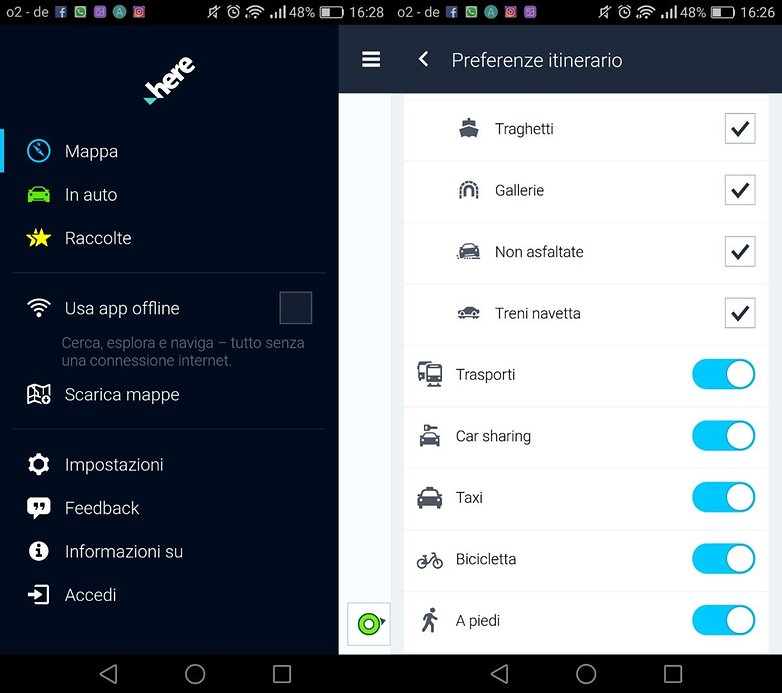
Here WeGo è decisamente un'ottima alternativa per navigare offline in città e non perdere la rotta. Scaricando quest'applicazione otterrete un vero e proprio navigatore offline che vi guiderà a destinazione, curva dopo curva, con la possibilità di cercare indirizzi e punti d'interesse ed ottenere immagini satellitari relative al traffico.
L'app mette a confronto i diversi mezzi a disposizione e fornisce perfino le tariffe di mezzi pubblici e taxi per permettervi di scegliere la soluzione più adatta alle vostre esigenze. L'aspetto che più ci interessa in questo caso sono le mappe offline di oltre 100 Paesi al mondo, pronte per essere scaricate prima di mettervi in viaggio.
Utilizzate altri navigatori GPS offline? Fateci sapere il vostro navigatore preferito!


Salve. Qualcuno conosce come scaricare un AUTOVELOX che funzioni OFFLINE.?
Vorrei utilizzare in auto un secondo smartphone che mi avvisi, ma senza dover mettere un'altra Sim a pagamento.
Quindi il tutto nella memoria del telefono.
piero.meoni@gmail .it
Se vai su Play Store ne trovi a decine. Io uso Tom Tom. Prova a vedere Radar Beep, l'ho usata per un paio di anni
Potresti scaricarti il gpx da importare nella tua app con una query al db di OpenStreetMap. Non posso inviare link, ma se cerchi Overpass Turbo ed inserici questo:
/*
This query looks for nodes, ways or relations
with the given key/value combination.
Choose your region and hit the Run button above!
*/
[out:json][timeout:25];
// gather results
(
// query part for: “type=enforcement”
relation["type"="enforcement"]({{bbox}});
);
// print results
out body;
>;
out skel qt;
Trovi gli autovelox.
Ho esagerato? Un tantino complicato?? 🤣😂
Chi dice che per utilizzare il GPS occorre necessariamente avere a disposizione internet?
Non lo dice nessuno, perché sono cose diverse.
Andava specificato che nei navigatori online viene richiesta l'attivazione del GPS per migliorare la precisione. Come va specificato che una prolungata attivazione del GPS scarica più velocemente la batteria.
Io sto cercando un AUTOVELOX che funzioni offline.
Avevo sentito parlare di un'app. che sfutta le mappe di Google offline, ma non lo trovo.
il mio obbiettivo è di adoperare un secondo smartphone senza sim per segnalarmi gli autovelox. Grazie se puo aiutarmi. A presto. Piero
Di solito gli autovelox o li prendono da tom tom o da here o da OpenStreetMap.
attenzione: OsmAnd è una merda!!! Gli dai una destinazione e ti porta da un'altra parte. E non c'è modo di fargli cambiare idea. L'ho disinstallato subito, appena ho capito che mi aveva fatto fare 100 Km in più.
Prova la nuova versione: 3.3.8 😉😁
Io cerco un gps che funzioni sul mio smartphone huawei P9 lite che funzioni off line e le cui mappe contengano anche sentieri tipo cammino di santiago, via francigena o simili. Potete aiutarmi, grazie
Osmand e qualsiasi app che usi dati OpenStreetMap. Se vuoi scaricarti il gpx di un sentiero completo cerca il sito waymarkedtrails sezione hiking e puoi ricercare i sentieri per nome tipo: Sentiero Italia. Naturalmente waymarkedtrails usa dati OSM 😉😁
Here we go assolutamente il top tra i navogatori offline! Non sbaglia un colpo, aggiornamenti costanti, puoi spostare le mappe su sd esterna e soprattutto puoi scaricare anche solo una piccola porzione di mappa (ad esempio, nel caso dell'Italia, puoi scaricare la singola regione)
Io un navigatore off line migliore del sygic non l'ho ancora trovato.
Ho provato tom tom, navigon,co pilot ed altri,ma nessuno si è dimostrato all'altezza di sygic. Una spanna sopra tutti gli altri per completezza d'indicazioni e precisione
Io uso MapFactor GPS navigation...gratuito (a pagamento con mappe tom tom) off line.
Personalmente preferisco il mio carissimo Garmin che uso da 17 anni e che aggiornò.. gratuitamente però condivido che google map sia il migliore.
Io uso Google Maps e, molto raramente Waze. Questo dopo aver provato molti Navigatori (sono ancora alla ricerca di quello che integri un alert sonoro per gli autovelox).
Girando in auto per me sono fondamentali precisione delle indicazioni e sul traffico, tutte cose che un servizio off line non può dare. D'altra parte, viaggiando più che altro in Italia centrale, non mi sono mai trovato in difficoltà per mancanza di connessione.
P. S.: se ci fosse un'anima caritatevole che risolvesse il mio su esposto problema ...grazie in anticipo
"Autovelox fissi e mobili". Non è esattamente un navigatore con rilevazione sonora autovelox incorporata, ma sembrerebbe avere avviso acustico e integrabile con GMaps
Ti ringrazio, ma io vorrei tutto in una sola applicazione
Waze avvisa della presenza di un velox solo se la velocità poco prima del transito è superiore al limite, quindi solo se necessario...Ottimo!
ECCO LA RISPOSTA: Icoyote
integra mappe Here e contiene avvisi per autovelox mobili, fissi, calcola la media di velocità Tutor, segnala incidenti, traffico però è a pagamento circa 12,00 euro 1 mese o 50,00 euro 1anno (se eviti una multa te lo sei già ripagato)
Grazie mille. Non è proprio ciò che cercavo, ma grazie!